
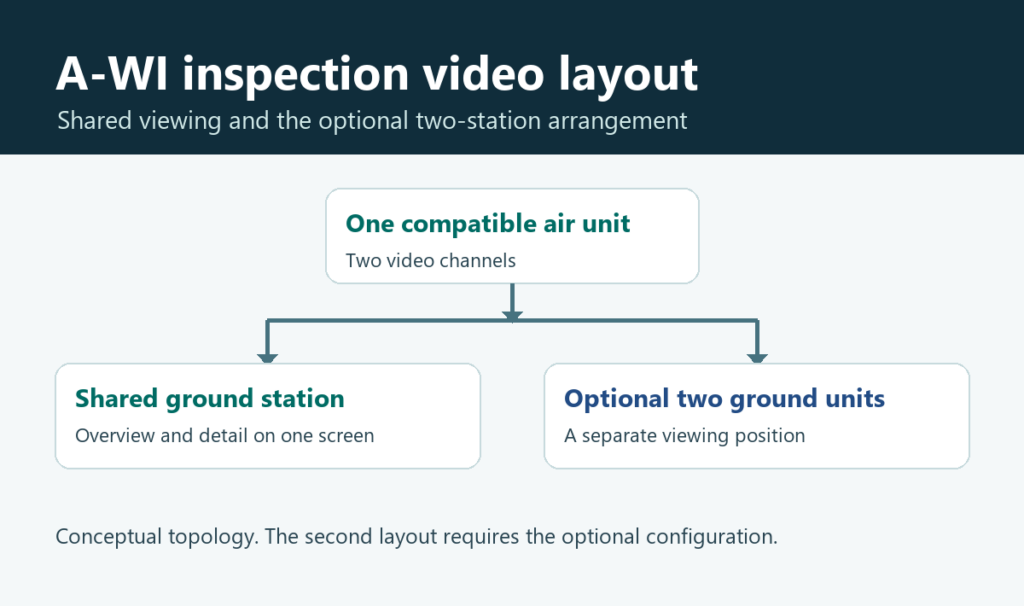
Dual-channel drone video transmission gives an inspection crew two views to work from. The layout decision is whether both views should remain available at one ground station or whether the job calls for a second station. The Seboar A-WI catalogue describes split-screen viewing and an optional arrangement with two ground units working with one air unit. Those are different equipment configurations. Decide who needs each view before choosing between them.
Use a shared screen when both views support the same inspection decision
The A-WI digital video transmission specification lists two video channels and a 1080p video specification. It also describes simultaneous views and split-screen display. A two-channel layout is useful when the crew needs a wide scene to keep track of a structure and a closer scene to interpret a detail. The display arrangement and the listed link resolution describe different parts of the system. The listing gives no per-pane resolution for a particular ground display.
Consider an inspection of building cladding with two suitable camera views. An overview can identify the panel and its position relative to a corner or joint. A detail view can help the crew decide whether the recorded area warrants a closer look. With one shared display, those views can sit together while the crew discusses a specific location. The screen arrangement should make it obvious which view supplies context and which supplies detail, including when both views show similar panels.
The order of the panes matters less than keeping the relationship clear. For example, a wide view that lacks an identifiable panel edge may contribute little, even if it is sharp. A useful split screen puts enough of the structure in the overview to locate the area shown in the second pane. That is a layout question that a resolution entry alone cannot answer.
Specify the second station only when the work needs a separate view
The A-WI catalogue describes its dual-operator arrangement as two ground units working with one air unit. It lists one-to-many operation as optional and says that extra hardware or configuration is required. The number of video channels in the ordinary viewing layout therefore does not establish what ships in a two-station package.
A second inspection position makes sense when the person identifying surface features must keep a view available while another crew member is using a shared overview. If the crew works together and needs to consult the details only at intervals, one split-screen station may cover both viewing roles. For a larger job, the separate station can give a reviewer a consistent place to follow the detail view. Specify the views each station needs, rather than treating two screens as a requirement on their own.
The product page also describes relay as an optional feature. A second viewing position and a relay intended to extend the link solve different problems. If the work only calls for a separate review position, describe that requirement directly and keep relay out of the equipment comparison unless the job independently needs it.
Keep the A-WI display, data and power interfaces separate
The A-WI specifications list external DC input at 7–28 V, a LAN port, 2.4 GHz Wi-Fi and a TTL transparent data interface. The Wi-Fi figure identifies the listed network interface. It cannot be used to infer the air link’s operating frequency. The TTL entry describes a data interface, and the product page does not identify it as a connection for an additional video display.
Draw the air unit and compatible ground receiver as the two parts of the video path. Mark the display task beside the ground receiver, then list the separate network and data connections the rest of the system actually needs. Associate the published DC rating with the equipment covered by the specification and identify the supply separately for each device in the proposed package. The product page leaves connector and pin assignments unspecified, so obtain the wiring information for the specific hardware before installation.
The drone video transmission equipment category groups air-side transmitters and ground-side receiving equipment. When comparing parts from that range, keep each air unit paired with its supported receiver. Listing two receivers in a layout does not prove either is compatible with the air unit or that the optional viewing mode is included.
Start with a shared ground station when the two views support one crew decision. Move to a separate station when a second role genuinely needs its own view for the duration of the inspection. That distinction determines the receiver arrangement and the interfaces that belong on the equipment plan.